✨ Math & science for grades 1–5
Screen time that builds real math & science skills.
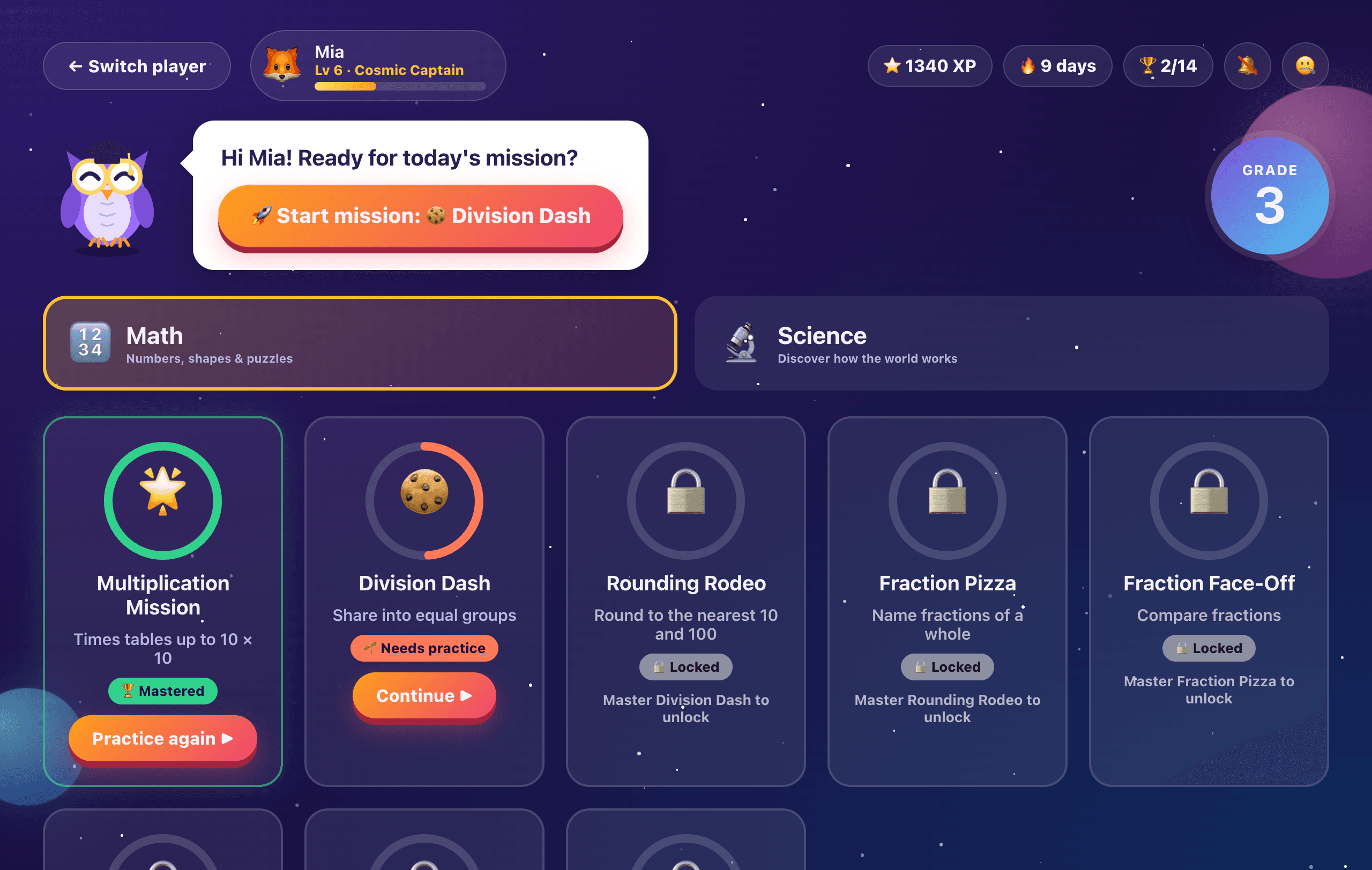
SparkQuest is a math and science learning game for kids in grades 1–5. They blast through 70 space missions with Professor Hoot, a friendly owl tutor who gives second chances, hints and step-by-step help, while you see exactly what they've mastered.
MacWindowsFree to try · Full adventure $39 once
- ✓Free to try
- ✓No subscription
- ✓No ads or pop-ups
- ✓Works offline
- ✓Reads questions aloud
- ✓Progress stays on your computer
- learning missions
- 70
- learning missions
- grades covered
- 1–5
- grades covered
- boss battles
- 10
- boss battles
- fresh math questions
- ∞
- fresh math questions
Why SparkQuest
Why parents choose SparkQuest
SparkQuest is a math and science learning game for kids in grades 1–5. It gives your child the extra practice and one-on-one help that's hard to fit into a busy school day, and gives you a clear view of their progress.
“I feel guilty about how much time they spend on screens.”
Screen time with a finish line
Most kids' apps are built to keep them tapping. Every SparkQuest mission is 10 questions with a clear end, so computer time finishes with a real skill practiced, not another hour of videos.
“They get stuck on homework and I can't always help.”
A patient tutor whenever they need one
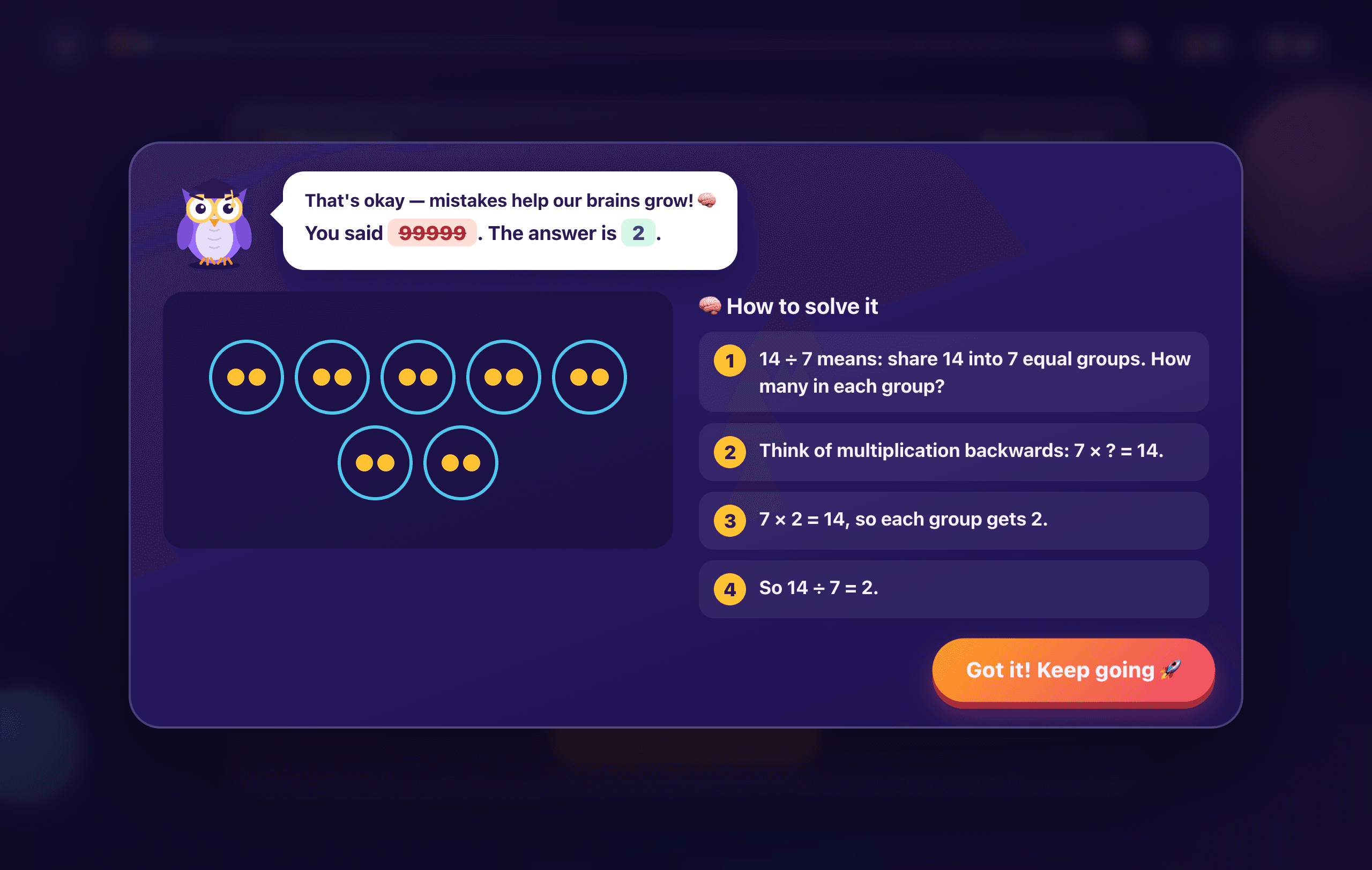
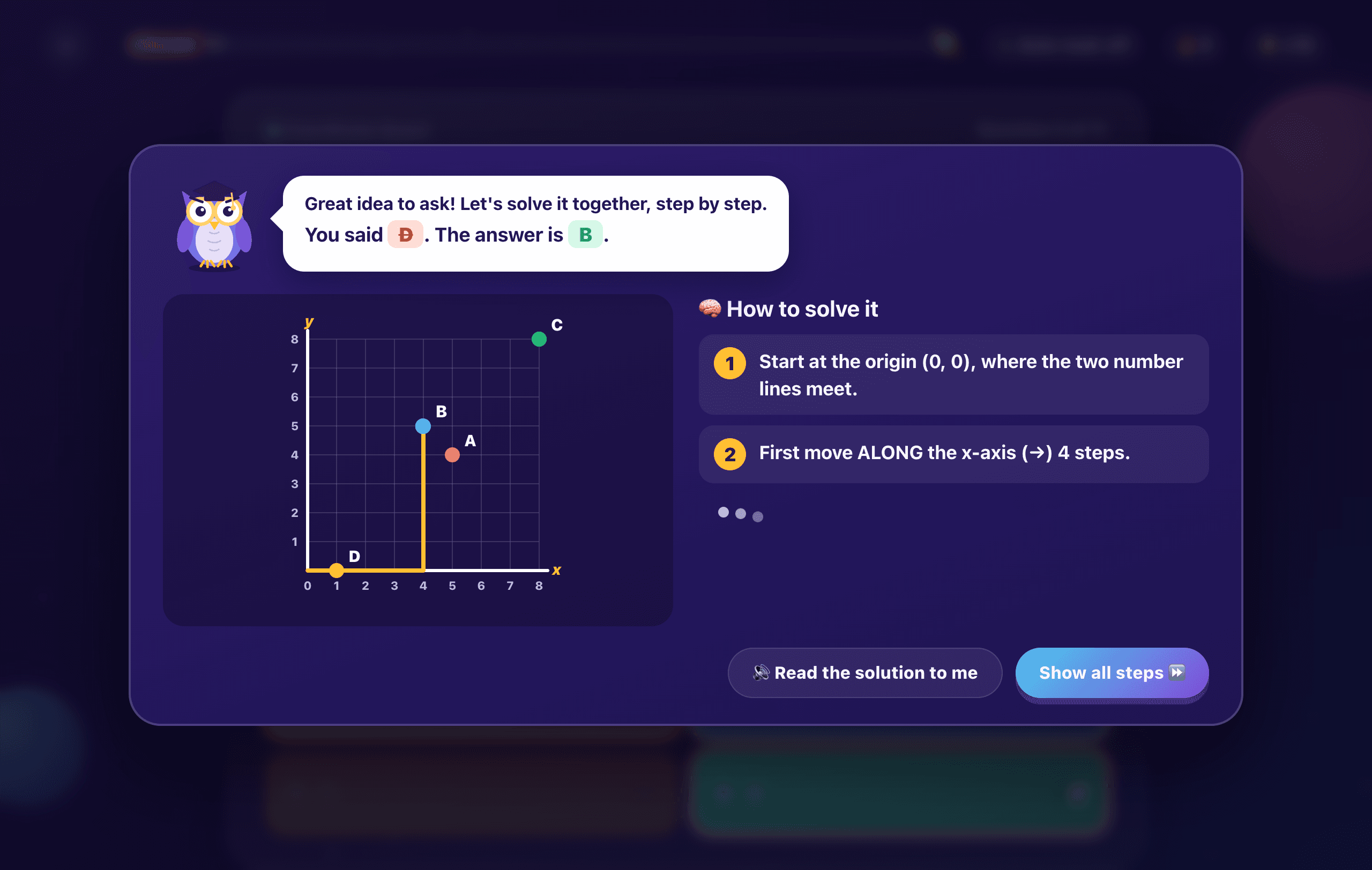
Professor Hoot gives a second try, a hint, then a step-by-step explanation with pictures, like a tutor sitting beside them while you're making dinner. Early readers can have every question read aloud.
“I never really know whether they're keeping up.”
See exactly where they stand
The Parent Dashboard shows which missions are mastered, what needs more practice and whether your child is ready for the next grade. No guessing and no waiting for the report card.
“I'm worried about gaps, or losing ground over the summer.”
Close gaps before they grow
Skills build step by step, and a mission only counts as mastered at 80% or better on the latest 20 questions. Pick the grade that fits your child and unlock missions early when they're ready to move ahead.
“Practice at home always turns into a battle.”
Practice they actually ask for
XP, levels, daily streaks and 10 boss battles make review feel like a game, and kind feedback means mistakes build confidence instead of tears.
“Free apps are full of ads, upsells and data collection.”
One price. No ads. No upsells.
Try 20 missions free, then unlock everything for $39 once for every child in your family. No subscription, no ads, no chat, and progress stays on your computer.
How it works
Feels like a game. Works like a tutor.
Each 10-question mission is short enough for a busy afternoon and designed so kids never get stuck and give up.
- Step 1
Pick today's mission
Every child gets their own explorer profile and mission map for their grade. Missions unlock in order, so skills build step by step — and Professor Hoot always suggests what to play next.
- Step 2
Get a second chance
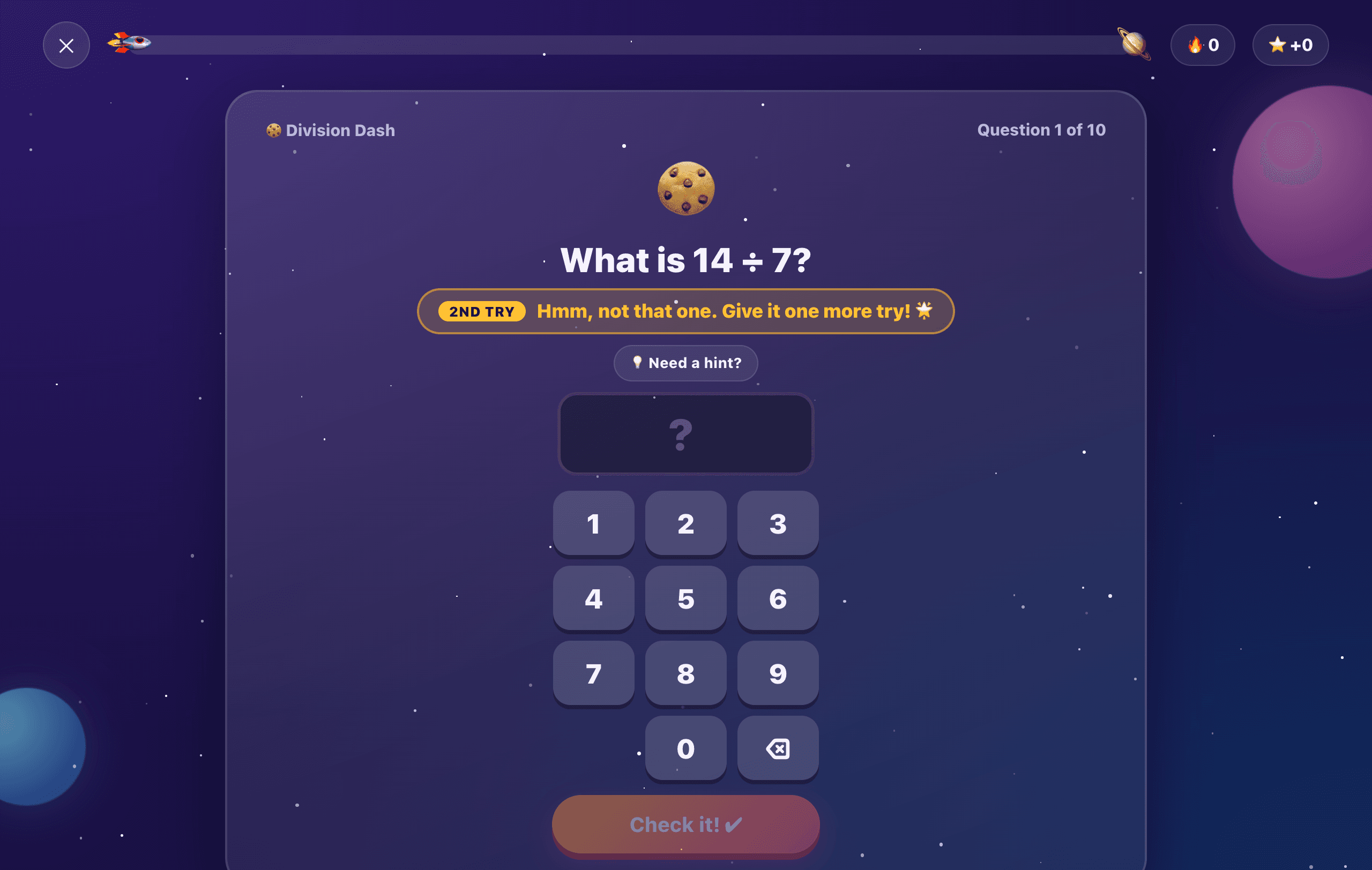
Miss a question? Instead of moving on, SparkQuest takes the wrong answer away and offers a hint, so kids learn to rethink rather than guess.
- Step 3
Learn from every mistake
Still stuck? Kids can ask to see how it's solved, one step at a time, with pictures — and a similar question pops up later in the mission to lock the skill in.
Why kids love it
Built to keep them curious
👾 Boss battles
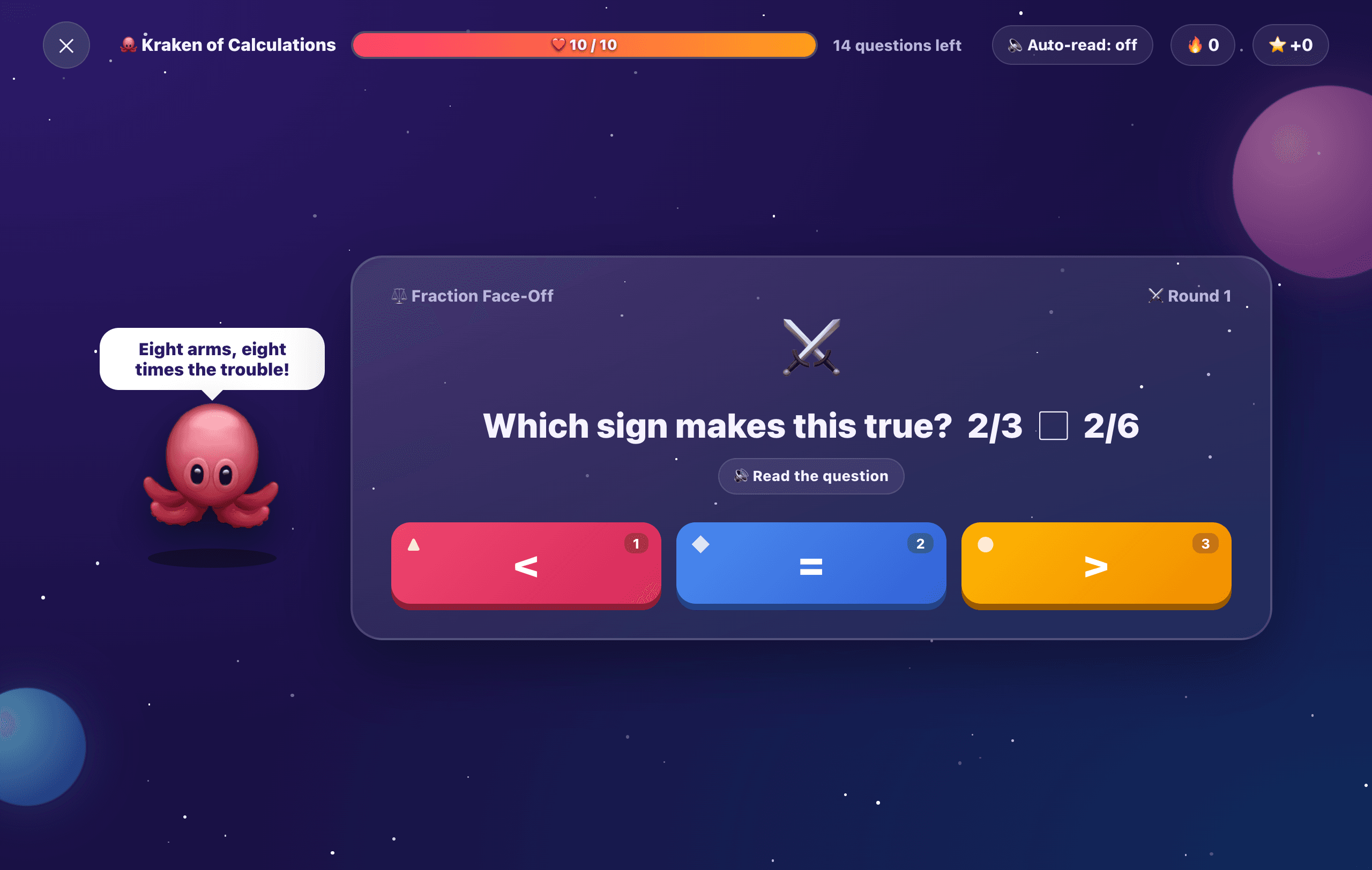
Beat the Fraction Dragon. Out-count Robo-Rex.
Every grade has a math boss and a science boss. Boss battles mix questions from every mission your child has unlocked — answer 10 correctly to win. It's review practice they actually ask for.
Reads aloud for early readers
A natural-sounding narrator reads any question or solution with one tap — or automatically. Choose from 4 voices and 3 reading speeds.
Pictures that make it click
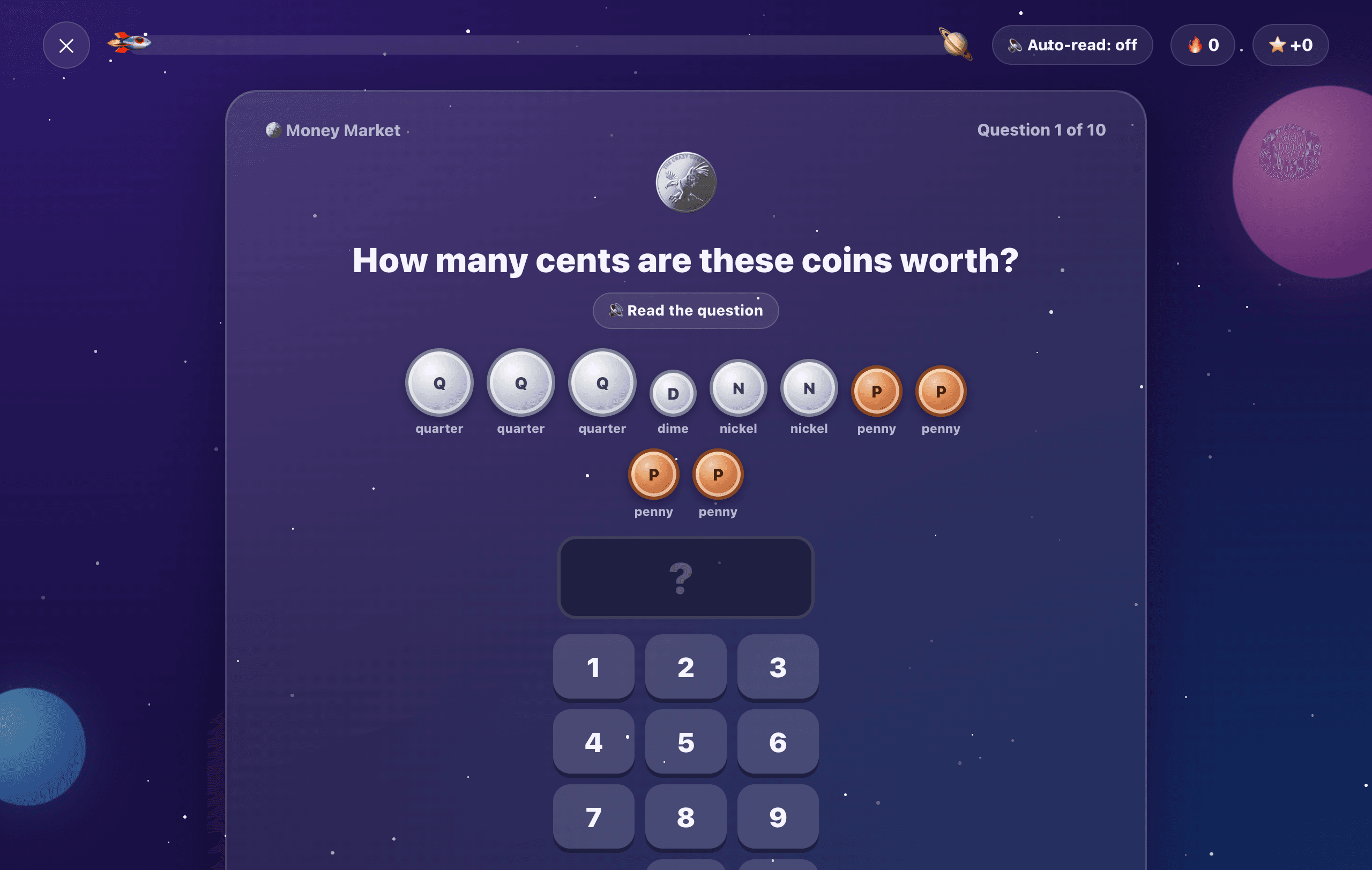
Clocks, coins, rulers, angles, shapes and coordinate grids turn abstract ideas into something kids can see.
Fresh questions every time
Math questions are generated on the fly, so kids practice the skill instead of memorizing the answers.
Mastery, not lucky guesses
A mission counts as mastered only after 80% or better on the latest 20 questions. Mastering one unlocks the next.
XP, levels & daily streaks
Kids earn XP, level up from Rookie Explorer to Legendary Brain, and keep their daily streak alive.
Kind, encouraging feedback
No harsh buzzers. Mistakes are met with “mistakes help our brains grow!” and a clear path to the right answer.
For parents
Know exactly where they stand
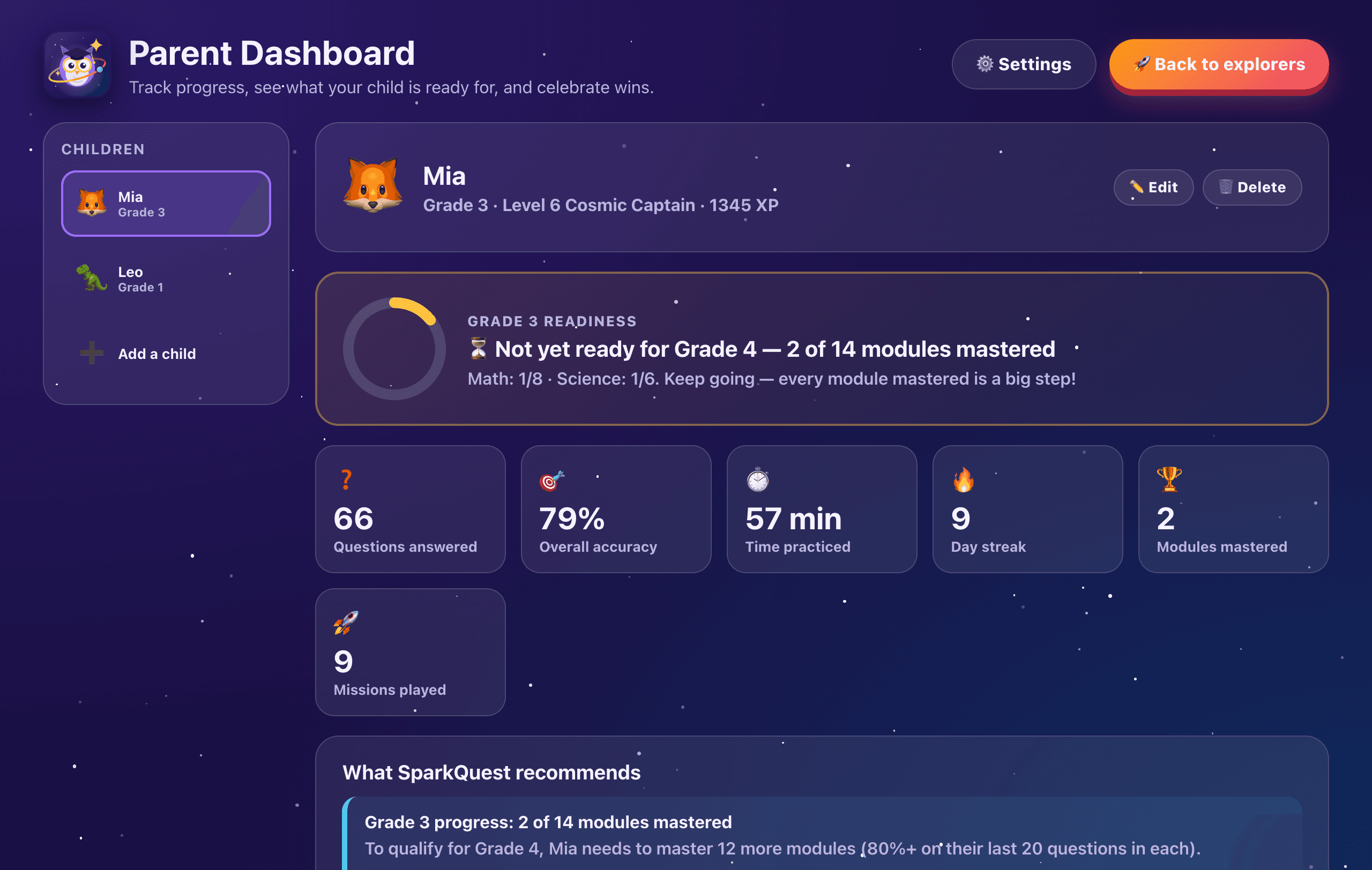
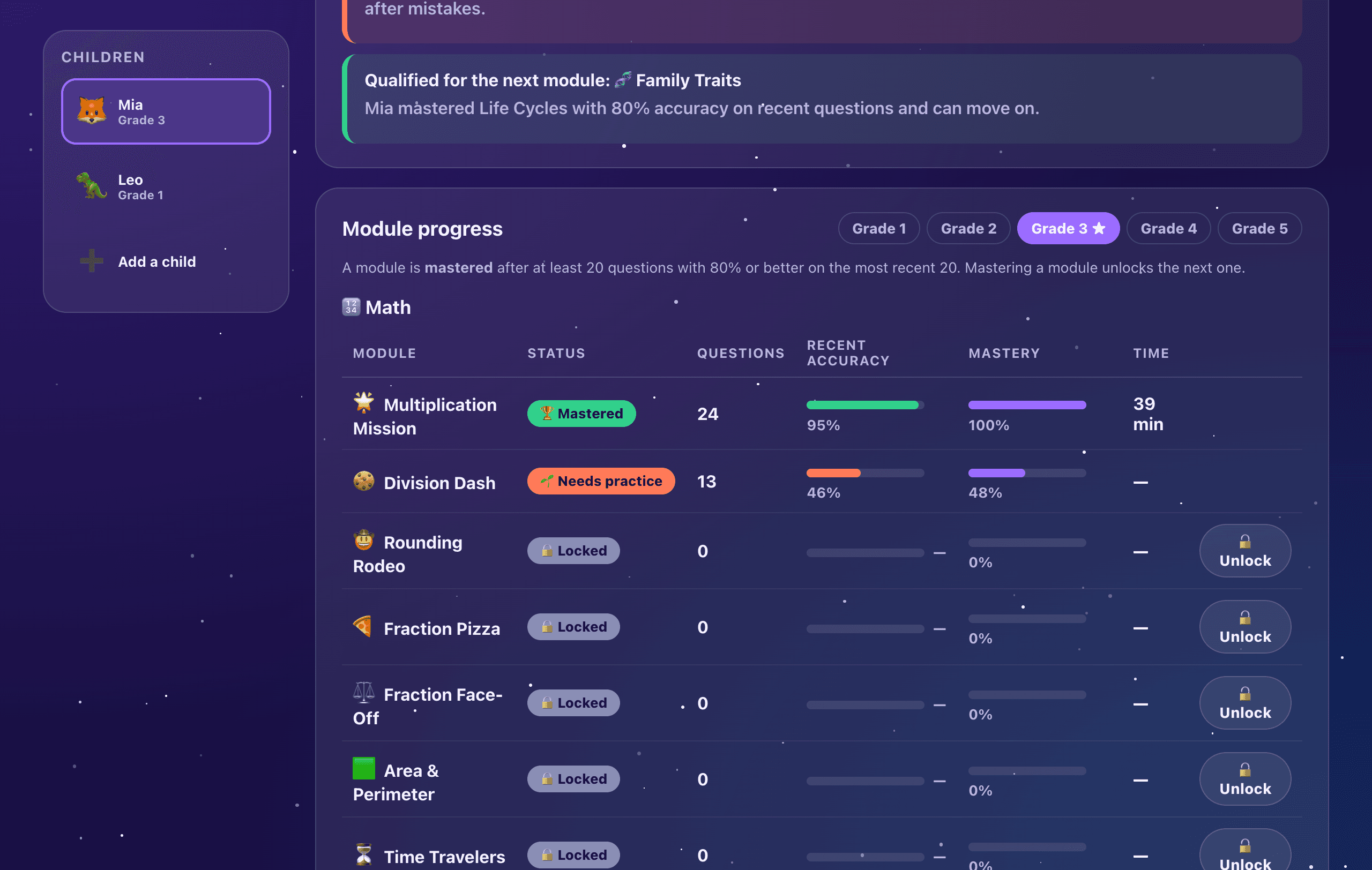
The Parent Dashboard turns every mission into a clear picture of what your child knows, what they're working on and what comes next.
Next-grade readiness
See at a glance whether your child is ready for the next grade, and how many missions are left to master.
Mastery for every mission
Accuracy, questions answered and time spent for each mission, plus which ones need more practice.
Clear recommendations
SparkQuest tells you what your child should work on next, and when they've earned a new mission.
Every session, logged
First-try scores, best streaks and session length for each mission, with a trend chart over time.
One app for all your kids
Add each child with their own grade, avatar and progress. Switch between them in a tap.
You stay in control
The parent area is PIN-protected. Unlock missions early, pick the narrator voice and set the reading speed.
What they'll learn
70 missions across grades 1–5
From counting to 20 to coordinate grids, from living things to the solar system. Pick a grade to see every mission. The ones marked Free are included before you buy.
Math8 missions
- Addition AdventureAdd numbers up to 20Free
- Subtraction SafariTake away within 20Free
- Mystery NumbersFind the missing number
- Alligator CompareBigger, smaller, or equal?
- Tens & Ones TowerPlace value up to 99
- Shape DetectivesSides, corners, and shape names
- Pattern ParadeSpot and continue patterns
- Tick-Tock TimeTell time to the hour and half hour
Science6 missions
- Living ThingsWhat makes something alive?Free
- Animal GroupsMammals, birds, fish, and moreFree
- Super SensesSee, hear, smell, taste, touch
- Weather & SeasonsSun, rain, snow, and wind
- Sun, Moon & StarsWhat we see in the sky
- Sound & LightVibrations, echoes, and shadows
Peace of mind
Made for kids. Built for parents.
No ads, no pop-ups
Nothing to tap away from the lesson, and nothing trying to sell to your kids.
Private by design
Progress is saved on your computer, not in the cloud. Kids don't need an account or an email address.
Works offline
Once it's installed, SparkQuest — including the voice narrator — runs without an internet connection.
No chat, no strangers
There are no social features, messages or leaderboards with other players.
Pricing
Try it free. Unlock everything once.
Start with free missions in every grade. When your kids want more, unlock the full adventure from the Parent Dashboard with a single purchase.
Free
Try SparkQuest with your kids and see if it clicks.
$0free forever
- The first 2 math and 2 science missions in every grade (20 missions)
- Voice narrator, hints and step-by-step help
- Parent Dashboard and progress tracking
- As many children as you like
Full Adventure
Everything in SparkQuest, for the whole family.
$39one-time purchase
- All 70 missions across grades 1–5
- All 10 boss battles
- Every child, on up to 3 family computers
- No subscription, and nothing for kids to buy
Secure checkout by Stripe. Your license key appears right away and arrives by email.
Teaching a classroom or homeschool co-op? Email us about group licenses.
Try SparkQuest free
Sign up with your email and download SparkQuest to your Mac or Windows laptop. Then create your parent PIN, add your kids — and blast off. Free missions in every grade are ready right away; unlock the full adventure whenever you like.
- MacmacOS 13 Ventura or later · Apple silicon (M1 or newer)
- WindowsWindows 10 or 11 · 64-bit
Questions
Parents often ask
How much does SparkQuest cost?
SparkQuest is free to download and try: the first 2 math and 2 science missions in every grade (20 missions) are free forever. The Full Adventure unlocks all 70 missions and 10 boss battles for $39, a one-time purchase with no subscription. Sales tax or VAT is added at checkout where it applies.
What ages is SparkQuest for?
SparkQuest covers grades 1 through 5 (roughly ages 6 to 11). You choose each child's grade when you set up their profile, and you can unlock missions early from the Parent Dashboard if they're ready to skip ahead.
Why should my child use SparkQuest?
Because it turns screen time into real progress. Kids practice math and science in short missions with a patient owl tutor who gives second tries, hints and step-by-step explanations, so they build skills and confidence instead of guessing. You get a Parent Dashboard that shows what they've mastered, what needs work and whether they're ready for the next grade, all without ads, chat or a subscription.
Does SparkQuest cover what my child learns at school?
It covers the core math and science topics taught in grades 1–5: addition, place value, telling time and money in the early grades, through multiplication, fractions, decimals and volume in grades 4 and 5, plus science from living things and weather to forces, energy, ecosystems and the solar system. You can browse all 70 missions in the curriculum section of this page.
Is SparkQuest good for homeschooling or summer practice?
Yes. Missions unlock in order and track mastery, so SparkQuest works as a structured math and science supplement for homeschoolers and a way to keep skills fresh over summer break and school holidays. It runs offline, so it travels well too.
How much time should my child spend on SparkQuest?
Each mission is 10 questions, so one or two missions make a focused daily session. Daily streaks reward coming back regularly, which is what makes skills stick, and the Parent Dashboard logs how long every session took.
My child is still learning to read. Can they use it?
Yes. A natural-sounding narrator reads questions and explanations aloud whenever your child taps the speaker button, or you can turn on auto-read so every question is read automatically.
What happens when my child gets an answer wrong?
They get a second try with the wrong answer removed and an optional hint. If they miss it again, Professor Hoot offers to show how it's solved, step by step, and a similar question comes back later in the mission.
Does SparkQuest need the internet?
Only to download it and, if you buy the Full Adventure, once to unlock it. After that everything — including the voice narrator — works offline, so it's great for car rides and flights with a laptop.
Where is my child's progress stored?
On your computer. SparkQuest doesn't upload your child's answers or progress anywhere, and kids never need an account or email address.
Can siblings share one computer?
Absolutely. Add as many children as you like. Each gets their own profile, grade, avatar and progress, and the Parent Dashboard shows each child separately.
Which computers does it run on?
Mac: macOS 13 Ventura or later · Apple silicon (M1 or newer). Windows: Windows 10 or 11 · 64-bit. About 400 MB of free space.
How do I unlock the Full Adventure after buying?
Your license key appears as soon as you've paid and is emailed to you too. Open SparkQuest, tap “Parents”, enter your PIN, choose “Unlock everything” and paste the key. Unlocking needs an internet connection once; after that SparkQuest works offline.
Can I use one purchase on more than one computer?
Yes. One purchase covers every child in your family on up to 3 computers. Moving to a new computer? Open the Parent Dashboard on the old one, choose “Full adventure” and then “Remove from this computer” to free up a spot.
I lost my license key. What do I do?
Search your inbox for “SparkQuest license key”, or enter the email address you bought with at sparkquest.kids/key and we'll send it again. Still stuck? Email us at hello@sparkquest.kids.
Ready for blast off?
Give your kids a learning adventure they'll want to come back to — and get a clear view of their progress.
Get SparkQuest 🚀